Pushytap KOBO. Field Operations on a Dedicated Radio.
Push-to-talk, lone-worker safety and dispatch in a dedicated PoC radio experience. KOBO puts everyday field actions on physical keys and compact screens, alongside the full Pushytap mobile app and Dispatch Console, so each role gets the device that suits it and everyone stays on the same system.
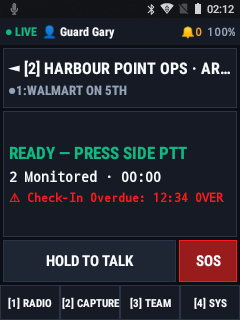
Purpose-built for radios
Different field roles. The right tools for each.
The Pushytap mobile app brings maps, rich forms, evidence capture and shift reporting together on a full-size screen. KOBO complements that workspace on dedicated PoC radios, where physical controls, compact displays and shared-device handovers shape the day. Guards, warehouse crews and logistics teams stay connected to the same talkgroups and dispatch, with an interface designed around the radio they carry.
Connected field operations
One operation. Three ways to stay connected.
Pushytap Dispatch
Web command console
Give dispatchers a shared view of the operation: fleet locations, talkgroup activity, SOS incidents, patrol records and field submissions.
- Live fleet map & SOS response
- Patrol audits & operational records
- Device management & provisioning
Pushytap App
Android smartphones: iOS waitlist
The full mobile workspace for supervisors, patrol officers and field teams. Combine push-to-talk and safety with live maps, detailed forms, photo and video evidence, notes and timesheets.
- Live maps & routing
- Forms, evidence & notes
- Safety & shift reporting
Pushytap KOBO
Dedicated PoC walkie-talkies
The dedicated-radio experience for guards, warehouse crews and shared fleets. Keep voice, check-ins, SOS and checkpoint scans close at hand, with physical controls and GPS updates to dispatch.
- Physical-key push-to-talk
- Lone-worker & SOS built in
- NFC/QR checkpoint scans
Whether they're on the mobile app, a KOBO radio or the Dispatch Console, your team shares the same talkgroups, safety workflows and operational picture.
Capabilities
Six capabilities for frontline radio teams.
Voice & Talkgroup Monitoring
Monitor up to four talkgroups, change channels with physical keys and hear spoken channel readouts. Listen-only groups and priority voice access help dispatch reach the right team, while speaker boost supports noisy work areas.
Shared-Radio Kiosk Mode
Keep shared radios ready for the next shift. Workers claim a unit with a badge, barcode or directory lookup and PIN. Compatible charging racks trigger wake-up and session release, keeping the device assigned to the person using it.
QR Provisioning & Sign-In
Configure radios with a provisioning QR from Pushytap Dispatch instead of entering account details on a small keypad. Device-code sign-in supports Okta and Microsoft Entra ID without an embedded browser.
Lone-Worker Check-Ins & SOS
A dedicated SOS key raises a high-priority alert to dispatch and teammates. Audible reminders and one-key check-ins help workers follow your lone-worker procedures and support Alberta OHS Part 28 readiness.
NFC & Offline QR Patrols
Record patrol checkpoints using NFC tags or QR codes on equipped radios. Scans are stored locally when coverage drops and sync when connectivity returns, giving dispatch a consistent patrol record.
Long-Haul & GPS Reporting
Extend communications to off-grid sites with Pushytap Long-Haul. Location updates keep dispatch informed while the radio stays focused on voice and safety. We will map the satellite service and relay setup around your operation.
Device trust
Keep control when a radio leaves your hands.
Protected Device Identity
KOBO protects each radio's device identity through the Android Keystore and uses signed connection proofs to verify it. Device trust gives your operation an additional layer of control beyond a worker's account or PIN.
Revoke Lost Devices
If a radio goes missing, dispatch can revoke it in the Pushytap Command Portal. Its active session is disconnected, and access remains blocked until your team authorizes it again, even if the person holding it has a valid worker PIN.
Hardware options
Three radio formats. One connected operation.
Compact Keypad Radios
Inrico T320 · Sonim XP3plus / XP5plus · Klein Valor · Boxchip S700A
Operate voice and core field actions with the D-pad and T9 keypad.
Rotary Compact Touch
Inrico S200 · Inrico T310 · Inrico T522A
Combine rotary channel selection with a compact touch display and talkgroup scan view.
Rugged PoC Handsets
Sonim XP8 / XP10 · Inrico T529A / S300 · RugGear RG725 / RG850
A larger field view for rugged PoC handsets, with native Android operation and no Google services dependency.
Choose the Right Experience
Choose KOBO for dedicated-radio workflows, the mobile app for rich on-screen fieldwork, and Dispatch for coordination. The shared capabilities keep your team connected; the differences help you equip each role.
| Capability | Pushytap KOBO | Pushytap App | Pushytap Dispatch |
|---|---|---|---|
| Push-to-talk voice | ✓ | ✓ | ✓ Talk & monitor |
| Talkgroup signaling & presence | ✓ | ✓ | ✓ |
| Sub-100ms NEO voice path | ✓ | ✓ | — |
| Long-Haul satellite mode | ✓ | ✓ | — |
| Hardware device trust & revocation | ✓ | ✓ | ✓ Control |
| Shared-rack kiosk mode | ✓ | — | ✓ Staging |
| SOS & lone-worker check-ins | ✓ | ✓ | ✓ Command |
| GPS location reporting | ✓ | ✓ | ✓ Live map |
| Patrol NFC / QR scans | ✓ | ✓ | ✓ Audits |
| Quick voice incidents | ✓ | ✓ | — |
| Live maps | — | ✓ | ✓ |
| Multi-page forms & evidence library | — | ✓ | ✓ |
Two-way radio dealers
Bring connected field operations to the radios you sell.
Straightforward Fleet Deployment
Deploy KOBO through USB or your device-management tools without setting up Google accounts on each radio. Establish a repeatable configuration for your customer's fleet.
Customer-Ready Radio Staging
Use the customer's provisioning QR to connect radios to their Pushytap environment before delivery. Hand over a fleet prepared for their talkgroups and dispatch workflows.
Service Beyond the Hardware Sale
Build an ongoing customer relationship around Pushytap voice, dispatch and lone-worker workflows. Pair the radios you supply with configuration, deployment and support services.
Frequently asked questions
Which radios run Pushytap KOBO?
KOBO supports compact keypad radios, compact touch radios and rugged PoC handsets, including models from Inrico, Sonim, Klein and RugGear. It runs on devices with as little as 512 MB of RAM. Talk to us about your radio model, Android version and accessories to confirm the right configuration.
Does KOBO need Google Play Services?
No. KOBO runs on Android AOSP without Google Play Services or Firebase. Radios do not need a Google account or the Play Store, giving fleets a straightforward deployment option for dedicated devices.
Can KOBO radios and the Pushytap app share talkgroups?
Yes. KOBO radios, the Pushytap mobile app and Pushytap Dispatch share talkgroups, presence and operational records. A supervisor using the mobile app can speak directly with a guard on a keypad radio through the same sub-100ms Pushytap NEO voice path.
How do shared radios work across shifts?
Kiosk Mode lets workers claim a shared radio using an NFC badge, barcode or name-directory lookup with a PIN. With a compatible charging setup, removing the radio wakes it for sign-in; returning it clears the worker session and releases it for the next shift.
What happens if a radio is lost or stolen?
Each radio has a device identity protected by the Android Keystore. Dispatch can revoke its access from the Pushytap Command Portal, disconnecting its session even if the person holding it knows a valid worker PIN.
Does KOBO work over satellite links?
KOBO supports Pushytap Long-Haul for off-grid operations, with satellite voice and GPS updates to dispatch. Your satellite service, relay hardware and operating conditions shape the deployment. See the Long-Haul solution page or talk to us about your site.
Ready to deploy Pushytap KOBO on your fleet?
Tell us your fleet size, radio models and field workflows. We will help you choose the right mix of KOBO radios, the Pushytap mobile app and Dispatch.